
How the Caddo Parish Court Calendar Works
Caddo Parish spreads its court dates across more than one source. The Clerk's Daily Criminal Docket posts the criminal settings for First Judicial District Court for the Parish of Caddo. The District Attorney's search shows the next future date on an adult criminal case. Clerk Connect works as a record inquiry rather than a plain calendar. The Civil Suit Daybook tracks new filings. It does not list upcoming hearings. Shreveport City Court and Blanchard Mayor's Court keep their own municipal calendars. So a Caddo Parish court schedule question starts with one step. Match the case to its court and clerk.
What a calendar shows is what was listed when you looked. It cannot prove a charge or a judgment. It cannot prove a warrant or a deadline either. And a matching name may not be your person. Save the docket number, court, date, time, courtroom, judge, section, event label, source URL, and access date. Then verify anything important with the office holding the case.
Caddo Daily Criminal Docket
The Caddo Clerk Daily Criminal Docket is a public display, not a name search. Its columns cover defendant name, time, date, courtroom, judge, and section. For same-day criminal settings, this is the most direct calendar the Clerk website offers. There is no date picker, filter, pagination, or export. The page also asks courthouse visitors to silence mobile phones.
Treat the display as a snapshot. It shows only what is posted on that single day. It is not a historical case register. For a fuller criminal docket, turn elsewhere. Try the clerk's criminal inquiry, a public minute-entry route, or the right clerk desk. Dates can be continued, removed, or reassigned after any check.
Caddo Parish Court Date Lookups
The Caddo District Attorney criminal date search takes a last name, first name, or docket number. It returns only cases with a future court date. Open a matching full name. You may see the docket number, next date and time, courtroom number, and judge. A blank result does not mean no case exists. It may mean no future setting, a different court, a spelling difference, or a gap in the tool's data.
- Read the court name and docket number from the notice or citation.
- For a district criminal case, search by docket number or last name on the DA date page.
- Compare a next-date result with the Daily Criminal Docket when both apply.
- For civil or domestic matters, use Clerk Connect and the civil minutes route rather than the DA search.
- For Shreveport City Court or a town court, use that court’s own calendar or clerk route.
- Call the relevant clerk or court office and consult the party’s attorney before acting on an important date.
Each calendar covers its own turf. A Shreveport Police citation belongs in Shreveport City Court, not on the First Judicial District criminal calendar. Juvenile records follow a separate and generally confidential route. Federal matters sit outside the Caddo Clerk system entirely.
Caddo Court Date Source Conflicts
The DA result page offers its information as is. It guarantees nothing about accuracy or completeness. If a DA next-date result and the Daily Criminal Docket disagree, save both pages. Note the times you viewed them. Treat the conflict as a reason to verify, not as a chance to pick the answer you prefer. Calendars update on different cycles. A later minute entry or order controls the real setting.
eClerks LA and the LCRAA Statewide Portal are statewide layers, not stand-ins for Caddo's own schedule. They help with participating index or criminal-minute access. But a portal hit does not prove a hearing is still set. Confirm the current date with the district clerk, the court office, or the filed notice.
For verification, call criminal minutes at 318-226-6786. Civil and domestic minutes route through 318-226-6785, civil filings through 318-226-6776, and civil copies through 318-226-6791. The Caddo Clerk contact page lists these separate desks. The Caddo Parish Clerk of Court is Mike Spence.
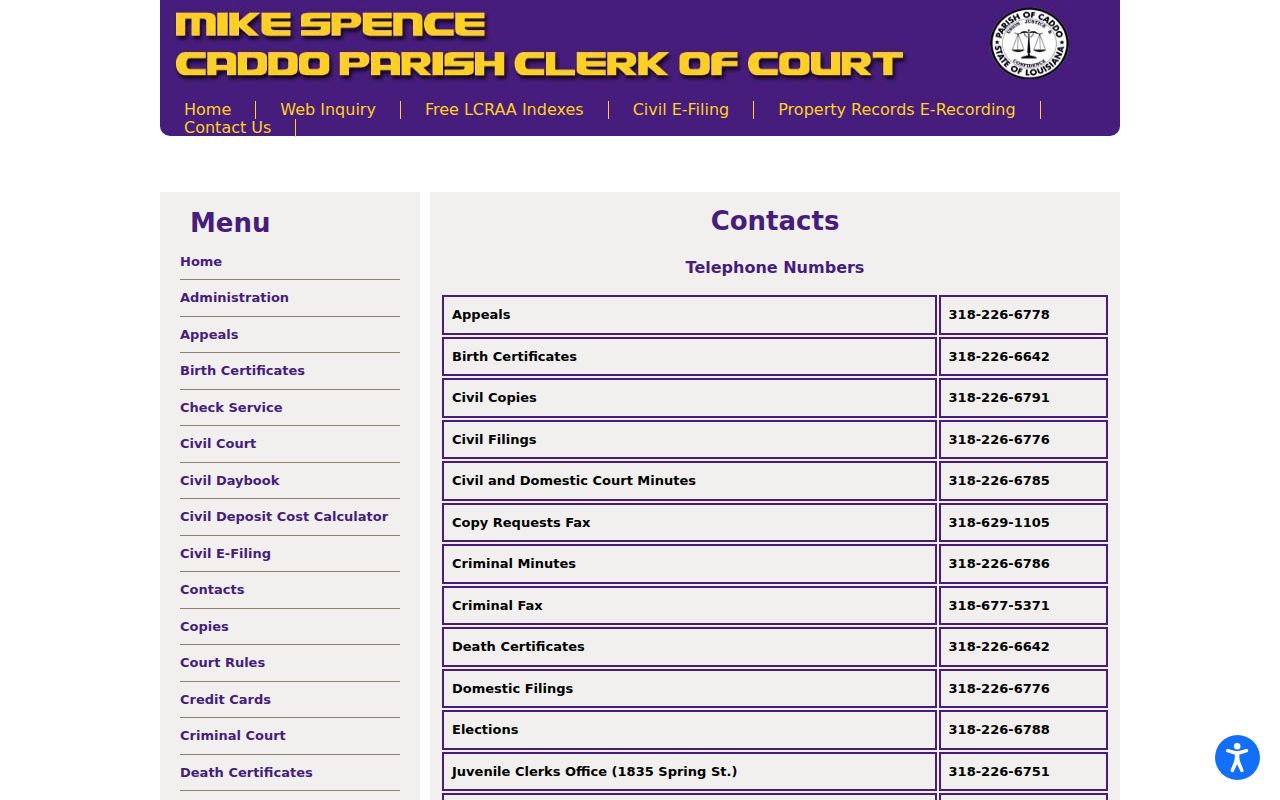
Call the desk that matches the court record you need. A general office line is not the calendar authority.
Court Settings: What Each Field Means
A setting is a scheduled court event. Its fields only make sense together. A date or courtroom alone tells you nothing about the legal purpose of the appearance. The Daily Criminal Docket and the DA details give criminal matters a useful field set. Civil or municipal calendars use different labels. The docket number remains the strongest link between a calendar line and the right case.
| Date | The calendar date for the listed event. It can change by later order, minute, or notice. |
|---|---|
| Time | The listed time may be a docket call or a specific setting. Confirm the event instructions. |
| Courtroom or section | A location and assignment clue, not proof of the event’s result or jurisdiction by itself. |
| Judge | The presiding or assigned judge shown for that setting. Assignments can change. |
| Setting type | Arraignment, status, motion hearing, trial, sentencing, or another label. The minute or order provides the outcome. |
Caddo Courtroom and Section Listings
The Caddo Clerk judicial roster maps the current civil, domestic, and criminal sections. It also lists public office information. The Louisiana district-court rules appendix holds the formal division and section-assignment structure. Both help decode the courtroom, judge, and section fields on a Caddo Parish court schedule. Neither promises a hearing will happen at the listed time.
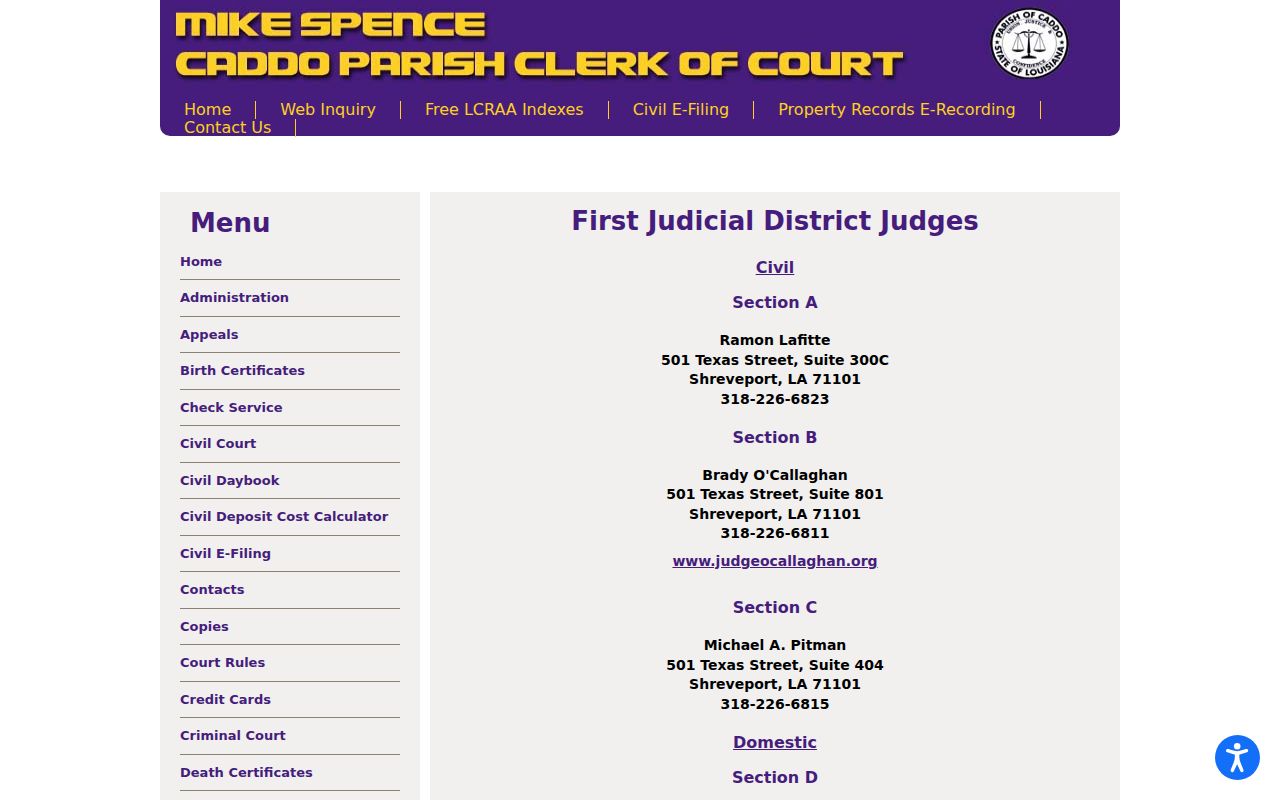
Check the roster against the specific docket entry. Recusals, reassignments, temporary assignments, and later orders can all change who presides.
When a Court Date Moves
A reset means the court event moved. The new setting can also change shape. A status date may turn into a motion setting. It could instead become a plea date or a trial assignment. Proof comes from the new docket entry, a minute, an order, or a notice. Direct confirmation from the clerk or court office works too. A date vanishing from a public calendar does not mean the case was dismissed. It also does not mean the case was completed.
Civil and criminal dockets differ here. The Clerk's Civil and Domestic Court operations hold the entered motions. They also hold trial dates and notices of judgment. On the criminal side, the Daily Criminal Docket is only a snapshot. The DA search covers future dates in a limited way. A continued setting may appear differently, or not at all, on the two tools. An attorney of record can explain a party's instructions. But the clerk-held record is still where an official copy comes from.
Caddo Civil and City Court Dates
Civil hearing dates in Caddo Parish do not run through the district criminal path. Start with the Civil Suit Daybook. It helps you spot intake activity once you choose Civil Inquiry in Clerk Connect. It is not a future hearing calendar, though. For entered motions, trial dates, or notices of judgment, go to the civil minutes desk and the case record. Keep filing dates and hearing dates apart.
Shreveport City Court runs its own calendars. Its official City Courts page links to separate criminal and civil Google calendars and a Tyler court-records portal. Blanchard posts a Mayor's Court calendar with a 9:00 a.m. court reference. That is a municipal calendar, not a district-court one. Use each lower court's route only for the matters it maintains.
Missed Settings and What Comes Next
Missing a court date can bring real consequences. What follows depends on the case type and the court's order. A criminal no-appearance may raise bond or warrant issues. A civil failure to appear can affect how the court handles a motion or another scheduled event. The record decides the outcome. A calendar line alone cannot tell a person what legal consequence has occurred.
Missed a setting? Contact the attorney of record or the clerk and court office that maintain the case as soon as possible, using the docket number and the scheduled date.
Ask whether a new setting, minute entry, order, or notice has been entered, and obtain the current official information before traveling to court.
For legal advice about an appearance, deadline, bond, or court order, consult a licensed Louisiana attorney.
Caddo Court Day Checklist
Recheck your date source before any planned appearance. Confirm the court, section, courtroom, and event type. Carry the docket number and your current notice. The Clerk's public office and the courthouse facilities keep separate access information, and security procedures or a closure can shape a visit. The facilities material lists different office and building schedules, so the particular court or clerk office controls access.
Bring any notice that identifies the case. A familiar courthouse address is not proof of the right venue. Caddo district court, Shreveport City Court, Juvenile Court, the justice courts, and the mayor's courts each keep their own calendars and may work from different locations. If an online listing is unavailable, ask the responsible clerk or court office about a current courtroom posting or docket call.
For a setting that touches a legal right or deadline, lean on the filed notice, order, or minute. Get direct confirmation too. The responsible office is the one to give it. A court calendar is a fine public routing tool. It is not a certified docket, a judgment, a transcript, or a deadline calculation.